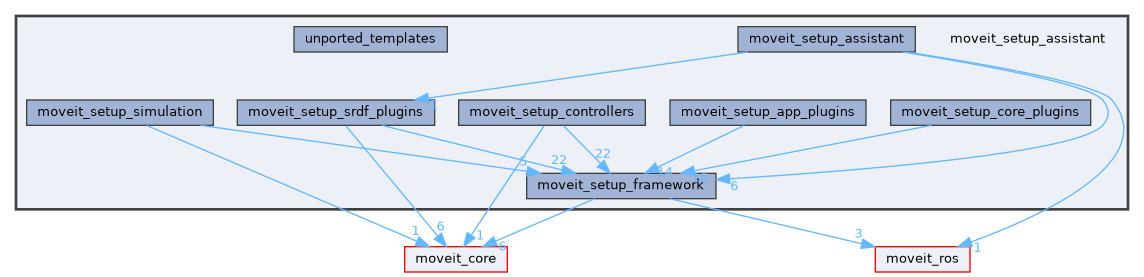
Detailed Description
MoveIt Setup Assistant 2.0
Migration Progress
Fully Ported
- moveit_setup::core::StartScreenWidget
- moveit_setup::srdf_setup::DefaultCollisionsWidget
- moveit_setup::srdf_setup::VirtualJointsWidget
- moveit_setup::srdf_setup::PlanningGroupsWidget
- moveit_setup::srdf_setup::RobotPosesWidget
- moveit_setup::srdf_setup::EndEffectorsWidget
- moveit_setup::srdf_setup::PassiveJointsWidget
- moveit_setup::controllers::UrdfModificationsWidget
- moveit_setup::controllers::ROS2ControllersWidget
- moveit_setup::controllers::MoveItControllersWidget
- moveit_setup::app::PerceptionWidget
- moveit_setup::app::LaunchesWidget
- moveit_setup::core::AuthorInformationWidget
- moveit_setup::core::ConfigurationFilesWidget
Not Ported Yet
Notes
- PerceptionWidget is ported, except moveit_configs_utils needs to be modified to load sensors_3d.yaml. This may require adjustments to the format of sensors_3d.yaml
- Possible bug in PlanningGroupsWidget: Creating a new group does not properly create a new JointModelGroup
- There are additional templates that have not been ported in the unported_templates folder.
Quick Start
To run the Setup Assistant
ros2 run moveit_setup_assistant moveit_setup_assistant
To run the collision updater:
ros2 run moveit_setup_assistant moveit_setup_assistant --urdf <path_to_urdf/xacro> --xacro-args <optional_xacro_args> --srdf <path_to_srdf> --trials 100000
Core Design
There are four main goals with this refactored version of MoveIt Setup Assistant (MSA).
- Works in ROS 2
- Divorce GUI Logic from Functional Logic
- Add Extensibility
- Customizable Control Flow
To that end the functionality has been split into multiple packages, using a pluginlib-based class structure.
There are four primary classes.
- SetupSteps
- SetupStepWidgets
- SetupConfigs
- GeneratedFiles
SetupStep
Contains all of the non-GUI code necessary for doing one "screen" worth of setup. The interface contains two methods to implement:
- getName - A string for the name of the setup step
- isReady - Return true if the data necessary to proceed with this step has been configured
- onInit - Code to run when the method is first initialized. Useful for loading pointers to necessary SetupConfigs.
SetupStepWidget
Keeping the GUI code separate from the business logic, the widget here is implemented with QT. There's one widget for each SetupStep. The widgets are also configured so that they can be loaded via pluginlib.
Each widget has access to the RVizPanel, a common visual panel for displaying the robot itself.
The interface is comprised of
- onInit - For initialization
- focusGiven and focusLost for when the widget gains and loses focus.
- getSetupStep which returns a reference to the SetupStep associated with this widget.
The widgets can emit three Q_SIGNALS:
- dataUpdated - When the underlying data has been updated (which can cause other steps to become "Ready")
- advanceRequest - When this signal is received, the GUI should attempt to advance to the next step.
- setModalMode - A way to signal that the widget cannot be switched away from at this time.
SetupConfig
SetupConfigs are where all the data for each part of the configuration is stored in code. Collectively, all the configs are a replacement for the massive MoveItConfigData class in MSA 1.0.
In the config package (i.e. on the filesystem), data can be stored in one of two places.
- As a file in the package itself
- In the .setup_assistant yaml file in the root of the configuration package.
The interface for SetupConfig:
- onInit - For initialization
- isConfigured - Returns true if this part of the configuration is completely set up.
- loadPrevious - Loads the configuration from an existing MoveIt configuration. Arguments include the path to the configuration package AND the yaml node (if any) from the .setup_assistant file matching this config's name.
- saveToYaml - Optionally save "meta" information for saving in the .setup_assistant yaml file
- collectFiles - Collect the files generated by this configuration and add them to the vector. See further explanation of GeneratedFiles below.
- collectDependencies - Collect the names of the packages that should be dependencies in the generated package if this SetupConfig is used.
- collectVariables - Collect key/value pairs for use in templates. See further explanation of templates below.
Each of the SetupConfigs exist as singletons, managed by the DataWarehouse object. The configs are loaded via pluginlib so that the arbitrary new configs can be added and common operations can be run on all configs. Generically, the configs can be retrieved with
SetupConfigPtr get(string config_name, string config_class)
This returns a shared pointer to the generic SetupConfig with the given name. The config_class specifies how to load it with pluginlib. For conciseness, config_class has an empty default value, and you can register a class to be used with a given name.
For additional syntactic sugar, you can also specify the class via template and get back a pointer to the specific SetupConfig class, i.e.
config_data_->get<URDFConfig>("urdf")
GeneratedFile
This class is a container for the logic for a single file to appear in MoveIt configuration package.
The collectFiles method of SetupConfig allows us to specify all of the files we'd like to generate relative to a specific SetupConfig. There can be any number of files generated (zero, one or many) for each config.
- getRelativePath - Returns the path relative to the configuration package root
- getDescription - Returns an English description of this file's purpose.
- hasChanges - Returns true if this file will have changes when it is written to file
- write - Writes the file to disk
There are also two methods which depend on the implementations of the above methods.
- getPath - Appends the configuration package path passed in to the constructor with the relative path returned by getRelativePath.
- getStatus - Returns the status of the file, which may depend on hasChanges.
The status can be in one of five (5) states, as specified by the FileStatus enum.
- NEW - The file does not exist in the configuration package
- UNCHANGED - The file exists and would be the same as the generated file
- CHANGED - The file exists, but a new version will be written
- EXTERNALLY_MODIFIED - The file exists and was externally modified
- CONFLICTED - The file exists, was externally modified and there are changes to be written
Checking for external modification depends on the timestamps of the written files, which is why collectFiles and the constructor for GeneratedFile require passing in the timestamp of the last package generation.
Note it may be useful to call moveit_setup::createParentFolders before writing.
There is also YamlGeneratedFile as an easy abstraction of generating a YAML file. The write method is already implemented, and instead writeYaml must be implemented.
Templates
One additional special type of GeneratedFile is TemplatedGeneratedFile which generates a text file from a common template. The write method is already written, and instead you simply must specify the full path to the template via getTemplatePath. The file will be generated as a copy of the template but using the values of TemplateVariables inserted in the proper locations. The TemplateVariables are collected via SetupConfig::collectVariables.
The format for the templates is custom to MSA. Let's assume you have a TemplateVariable with key=GENERATED_PACKAGE_NAME and value=r2d2_moveit_config. The key surrounded by square brackets will be replaced with the value. For example,
<name>[GENERATED_PACKAGE_NAME]</name>
becomes
<name>r2d2_moveit_config</name>
Generated by
 1.15.0